Tutorial 8 of 8
Track your progress
One page holds everything you have done. It is worth opening once a week. Knowing where you get stuck is a skill, and this page is how you find out.
- Step 1
Open your progress page
- Go to
/student/progress. The heading reads My progress. - Read the three counters across the top: ActiveCode attempts, CodeLens views, and AI help requests.
- The AI help requests number is shown to you on purpose. It is not a score, and nobody is judging it. It is information about your own habits.
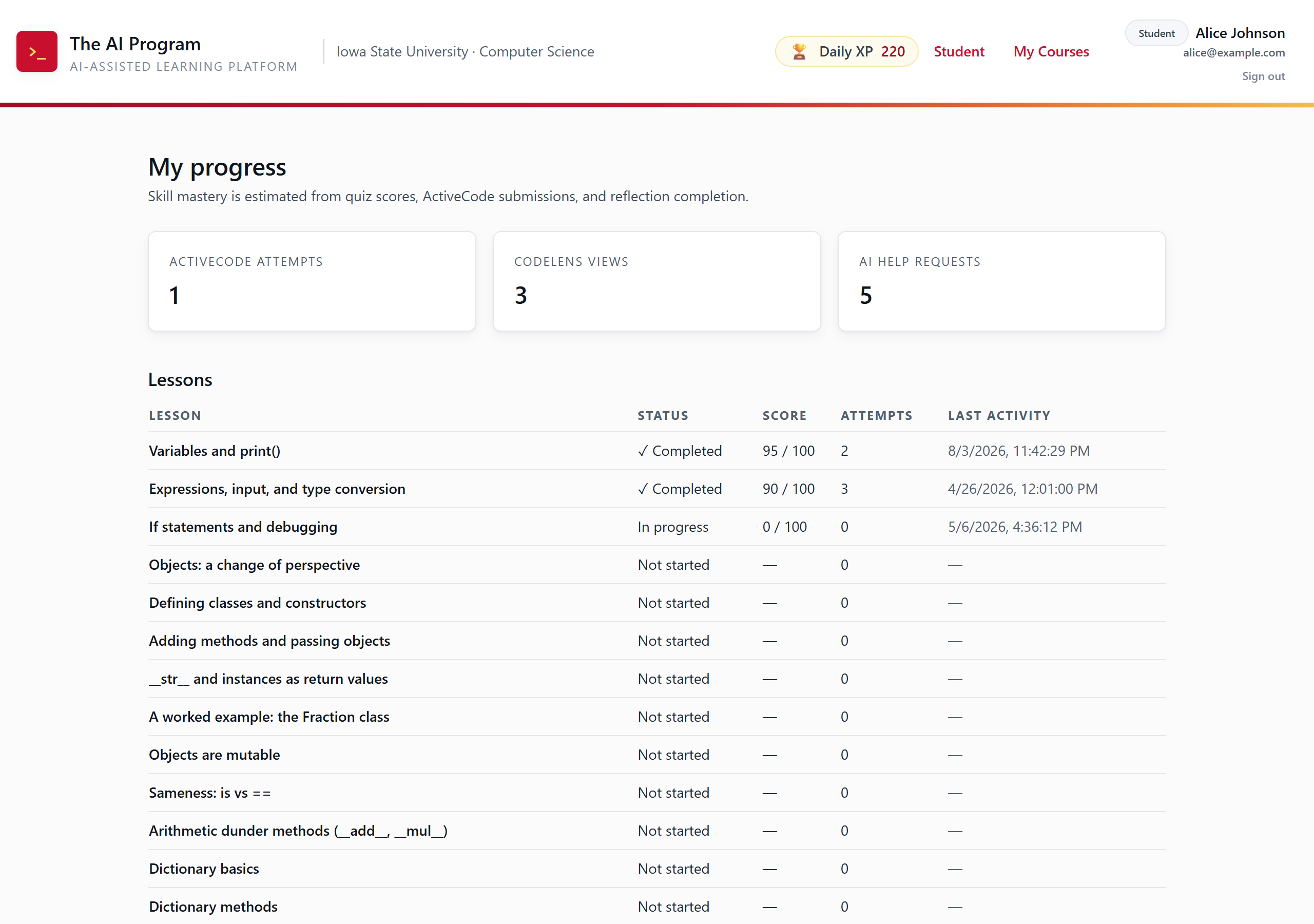
Your record. Every step, hint, and submission is counted here. - Go to
- Step 2
Read the lessons table
- Each row is one lesson: STATUS, SCORE, ATTEMPTS, and LAST ACTIVITY.
- Rows read Completed, In progress, or Not started.
- A high attempt count next to a completed lesson is not a bad sign. It means you iterated, which is what the course wants.
- Scroll to the bottom for your tutor preferences and the errors you make most often.
Tip. The common-errors list feeds back into how the AI tutor talks to you. The more honestly you work, the better the help gets.
- Step 3
Build the habit
- Check the 🏆 Daily XP pill in the header at the end of each session. That is today's progress.
- Come back to a lesson marked In progress before starting a new one.
- Predict, run, read the error, then ask. In that order. The whole platform is built around that loop.